
26MCSN Malaysia Guide: Game Categories, Promotions and Account Checks
If you came to 26MCSN to identify a game or an event, start with the category label. The 26MCSN information site groups its guides by game format. Use the guide that matches what the screen is asking you to choose or compare.
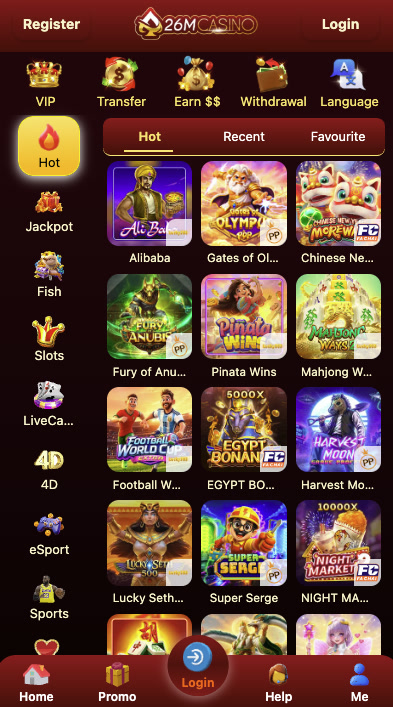
The captured player homepage shows the 26MCasino name. The mobile view gives Sports and eSport separate shortcuts, even though the promotion example below groups those two categories in one row. This guide explains where to check the format, how to read that row and what to confirm before providing account details.
The information site and the shared player platform
The first step when checking 26MCSN is to identify which site is open.
On 26mcsn8.com, browse in English or Malay before checking the rules for a specific game or market. The Sports and Esports guides have different examples because a match and an individual map can have separate outcomes. Keep the event name and the selected scope together when you return to a saved result.
The player-platform view captured for this guide was on 26mc.net and displays 26MCasino branding in the pictured mobile first screen. Promo appears in the bottom bar, while the category rail includes Slots, Sports and eSport. Use the category rail to identify the format and Promo to look for an offer’s own heading and terms.
Match the screen to the right guide
If a 26MCSN game displays RTP, the Gambling Commission’s guide explains how to interpret it as a theoretical average across many plays.
First identify what needs explaining: a symbol, a table result, a fixture period or a map. Match the full name and the label describing the scope before comparing the details.
| Guide | What to look for |
|---|---|
| Slots | Pair the supplier badge with the complete title. If a tile shortens a name, read the name inside the game’s help panel before applying rules about symbols or bonus features. |
| Live Casino | Record the name of the table and the dealer game or variant before checking a saved result. If a round code is available, use it to locate the specific display you are comparing. |
| Sports | Note the fixture, score period and market name together. The same teams may appear under first-half and full-time selections, which are assessed against different periods. |
| Esports | Start with the tournament and series, then find the map number if one appears. A team can win a map and lose the series, so check which result the entry refers to. |
Read the Sport & Esport row of the Welcome Bonus
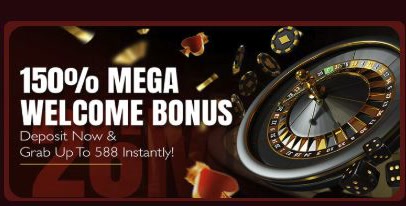
Use the full offer title when comparing the terms shown for 26MCSN.
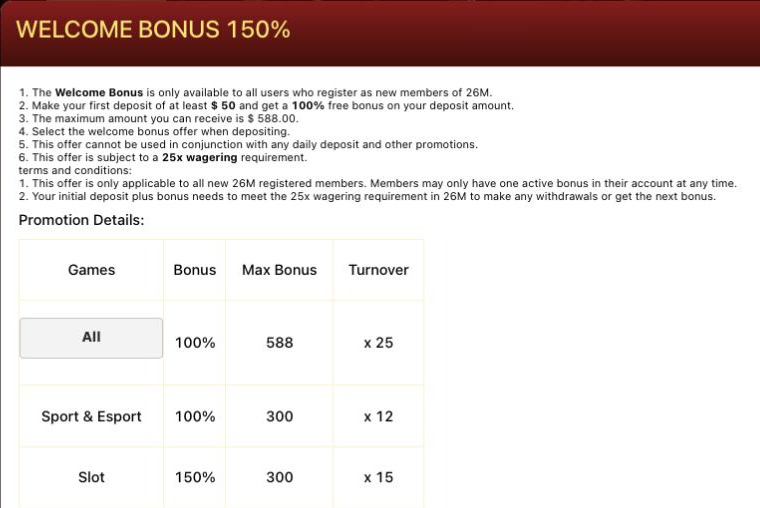
In the pictured Welcome Bonus 150% example from the 26MCasino Promotion page, the Sport & Esport row lists 100%, Max Bonus 300 and Turnover x12. The Slot row shows 150%, the same 300 cap and x15. Read all three columns from the same row so the headline rate or another category’s multiplier does not get mixed into your comparison.
The All row shows 100%, Max Bonus 588 and x25. The general text mentions x25 and says that only one bonus may be active at a time in this example. If you already have an active offer, or the general rule and category row seem to differ, confirm which condition applies from the current full terms before relying on either figure.
Checks before sharing account details
If you set a time or spending limit before using 26MCSN, keep it independent of recent results. GamCare’s odds guide explains why a run of outcomes does not tell you that a win is due. The Responsible Gambling Council explains how blocking software can restrict access to gambling sites.
- Confirm which service you intend to use. After a link opens, read the destination address and check the purpose of the form before sharing personal information.
- Look for the privacy notice applicable to that form. Check which details it requests and what the notice says about how they are handled.
- Match the chosen category to the current offer table. Read the turnover and bonus cap from its row, and see whether an existing offer affects eligibility.
- Decide your limits for time and spending in advance. Stop when either limit is reached and avoid adding money to make up a loss.
Frequently asked questions
How should I label a saved promotion link alongside a guide link?
Keep the page title and viewing date with each link so you can distinguish the offer from the guide later.
Where can I switch the guide language?
Choose BM or EN on the information site. Open the category again from that language’s navigation if you arrived on a saved link.
What should I hide before sharing an esports result?
Keep the event name and result label visible. Hide account identifiers, balances and payment details.
Does the captured panel show when the offer was updated?
The screenshot does not show when the offer was updated.
Where can I read more about personal limits?
The Responsible Gambling guide explains risks and practical ways to manage spending and time.
About the Author
For this 26MCSN overview, Danson checked the game guide categories and the promotion details.
Danson has more than 10 years of experience in the iGaming industry. He writes guides for readers in Malaysia on iGaming platforms, game categories, promotion terms, and account features. His guides help readers understand what each platform offers and identify what to check before making a decision.
Disclaimer. This guide provides general information. Game availability and promotion terms may change. Gambling involves a risk of losing money.